How to change radio in GTA 6
In a vehicle, hold Left on the D-pad to open the radio list, then push the right stick toward a station or step through them with L1 / R1 (PS5) or LB / RB (Xbox). To cut the sound, press X (PS5) or A (Xbox) while the list is open. On foot the same hold works, but only with headphones equipped.
Controls here are the defaults reported by the guides we cross-checked on 27 November 2026 (Polygon, GamesRadar+, Kotaku, IGN, Game8). Rockstar can rebind them in a patch: if a button does nothing, open Settings → Controls and check the radio-list binding.
How to change radio stations in a car
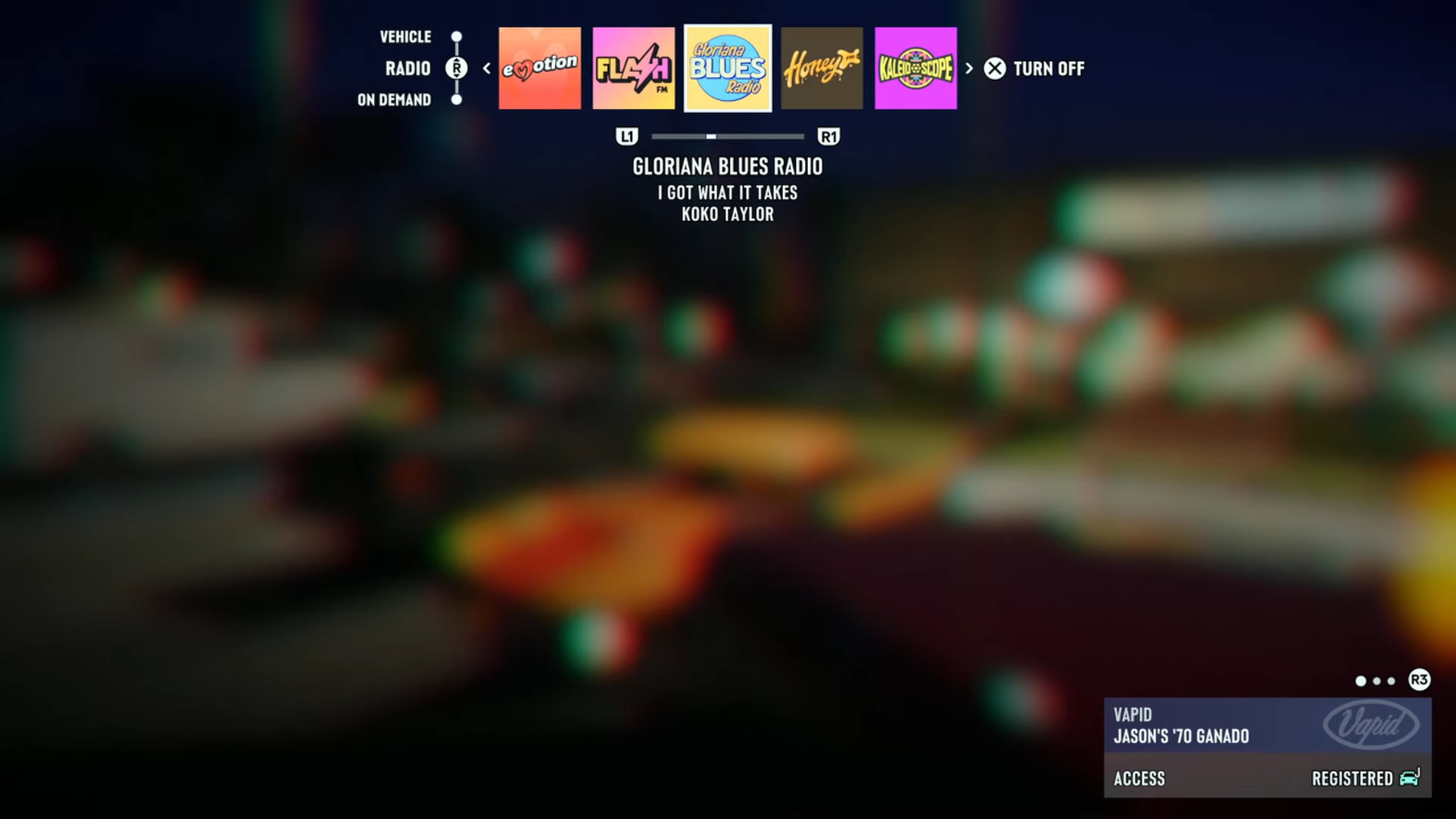
- Get in any vehicle. The car radio is on from the start — there is no item to find and no station to unlock first.
- Hold Left on the D-pad. Hold it, don't tap: a quick press does not open the list.
- Pick a station. Push the right stick toward the station you want, or move through the list with L1 / R1 (PS5) or LB / RB (Xbox).
- Release Left. The list closes and the station you highlighted keeps playing.
The list is an overlay: the game does not pause and the car keeps rolling while it is open, so change stations when you are stopped or on an empty road.
Turn the car radio off and on
- Off: hold Left to open the list, then press X (PS5) / A (Xbox). Nothing plays until you pick a station again.
- Back on: open the list again and select any station; the audio comes back with it.
- Off for good: Settings → Audio carries a vehicle radio switch, useful if you would rather hear only the world around you.
Listen to the radio on foot: headphones
The radio list only works outside a vehicle once you have headphones equipped.
- Own a pair of headphones. They are an equippable item you have to pick up in-game, not something you start with.
- Equip them. Hold L1 / LB for the weapon wheel, press R1 / RB to switch to the items wheel, push the right stick to the headgear slot (the second slot, top right) and press X / A to put them on.
- Hold Left on the D-pad while on foot. The same radio list opens, and the station plays through the headphones while the rest of the game's audio stays audible.
If the list will not open on foot, check the items wheel first — the headphones have to be equipped, not just owned.
Podcasts and on-demand shows
The radio menu also carries on-demand programmes, which is how podcasts work in GTA 6.
- Inside the radio list, push the right stick down to highlight On Demand.
- Browse the shows with L1 / R1 (LB / RB on Xbox) and press X / A to play one.
- Push the right stick back up to return to the music stations.
Which song is playing?
Note a lyric or an artist and check that station's page in this directory: every station page lists its credited tracks, and the full GTA 6 radio songs list collects all of them in one table.
Find a station by genre
| If you want | Station |
|---|---|
| '80s pop and new wave | Vice City FM |
| Heavy metal | The Chamber 106.6 |
| Pop and dance | Flash FM |
| Classic and hard rock | V-Rock |
| Country | Back Country Radio |
| Hip-hop | Vice City Rap Radio |
| House and techno | CircoLoco Records Radio |
| Jazz | Leonida Jazz Radio |
| Classical | Symphony FM |
| R&B and soul | Honey FM |
| Talk | WKTT and The Wipe |
The station directory has all 24 entries with DJs, hosts and tracklists.
If the radio list will not open
- You tapped instead of holding. Hold Left for about a second.
- You are on foot without headphones. See the equip steps above.
- A cutscene or scripted conversation is playing. The game ignores most input until control comes back.
- The station is not on your dial. Two entries here are unlockable rather than available from the start — The Vault Radio and The Sniper of La Perle — so a station you have read about may be tied to story or side content rather than to broken controls.
FAQ
How do you turn the radio off in GTA 6?
Hold Left on the D-pad to open the radio list and press X on PS5 or A on Xbox. Open the list again and pick a station to bring the sound back.
Can you listen to music on foot in GTA 6?
Yes. Equip a pair of headphones from the items wheel, then hold Left on the D-pad the same way you would in a car.
How many radio stations does GTA 6 have?
This directory lists 24 entries: 20 music stations, 2 talk stations and 2 special entries. The station directory breaks them down by genre and DJ.
Do you have to be in a car to change stations?
No. The radio list works anywhere once headphones are equipped; the car is simply where it works without extra gear.
Where can you hear the music outside the game?
Rockstar's official music page has short samples of select stations, and Spotify carries station playlists. See where to listen for both links.
Controls checked 27 November 2026 against published PS5 and Xbox guides. Independent fan guide, not affiliated with Rockstar Games.